> ## Documentation Index
> Fetch the complete documentation index at: https://docs.valiyou.com/llms.txt
> Use this file to discover all available pages before exploring further.
# Quick Start
> Get started with Valiyou in 5 minutes. Step-by-step setup guide including account creation, organization setup, plan selection, and your first valuation.
# Quick Start Guide
 **Get your sports organization up and running on Valiyou in just 5 minutes with our streamlined onboarding process.** This comprehensive getting started guide walks you through account creation, organization setup, subscription plan selection, and launching your first sponsorship valuation. Follow our platform tour to unlock the full potential of data-driven sponsorship management and valuation analytics.
## Step 1: Create Your Account
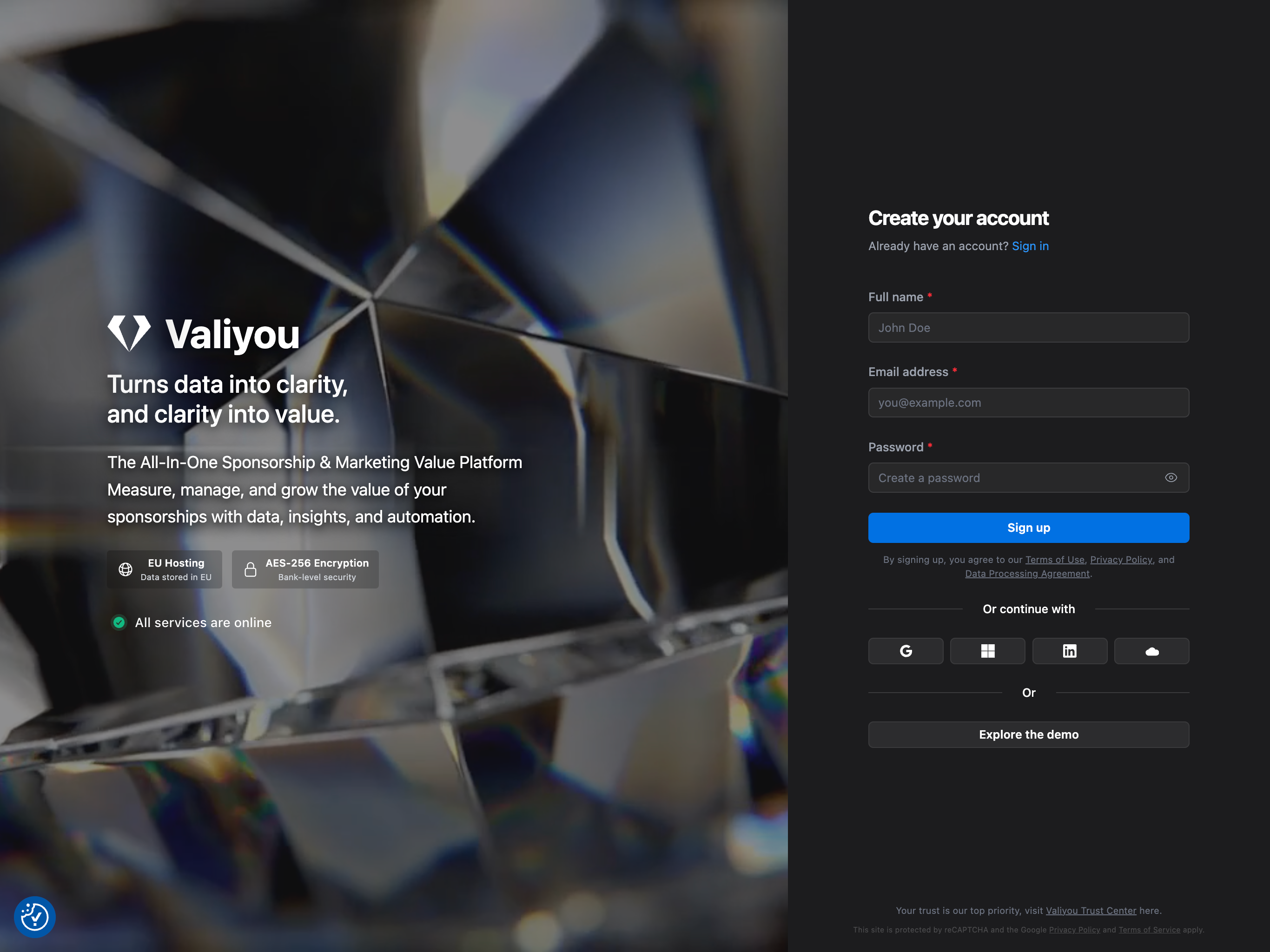
Visit [valiyou.io/auth/signup](https://valiyou.io/auth/signup) and create your account.
### Signup Methods
We recommend signing up with **email and password** for the best experience. Alternative options include:
* **Email and password** (recommended)
* Google Sign-In
* Microsoft Account
* LinkedIn
* Salesforce
### Email Verification
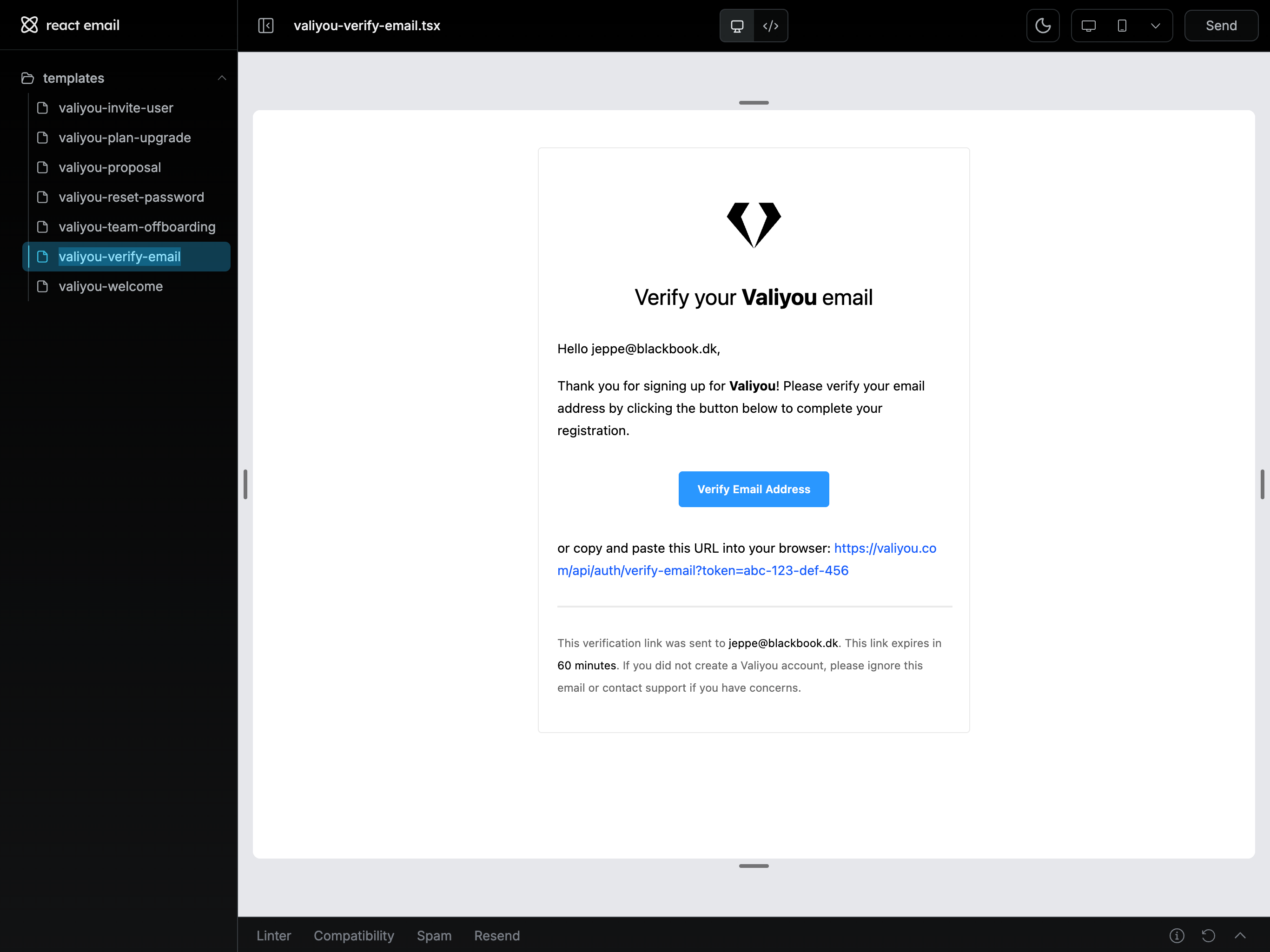
After signing up with email, you'll receive a verification email. Click the link in the email to verify your account before proceeding.
**Get your sports organization up and running on Valiyou in just 5 minutes with our streamlined onboarding process.** This comprehensive getting started guide walks you through account creation, organization setup, subscription plan selection, and launching your first sponsorship valuation. Follow our platform tour to unlock the full potential of data-driven sponsorship management and valuation analytics.
## Step 1: Create Your Account
Visit [valiyou.io/auth/signup](https://valiyou.io/auth/signup) and create your account.
### Signup Methods
We recommend signing up with **email and password** for the best experience. Alternative options include:
* **Email and password** (recommended)
* Google Sign-In
* Microsoft Account
* LinkedIn
* Salesforce
### Email Verification
After signing up with email, you'll receive a verification email. Click the link in the email to verify your account before proceeding.
 ## Step 2: Set Up Your Organization
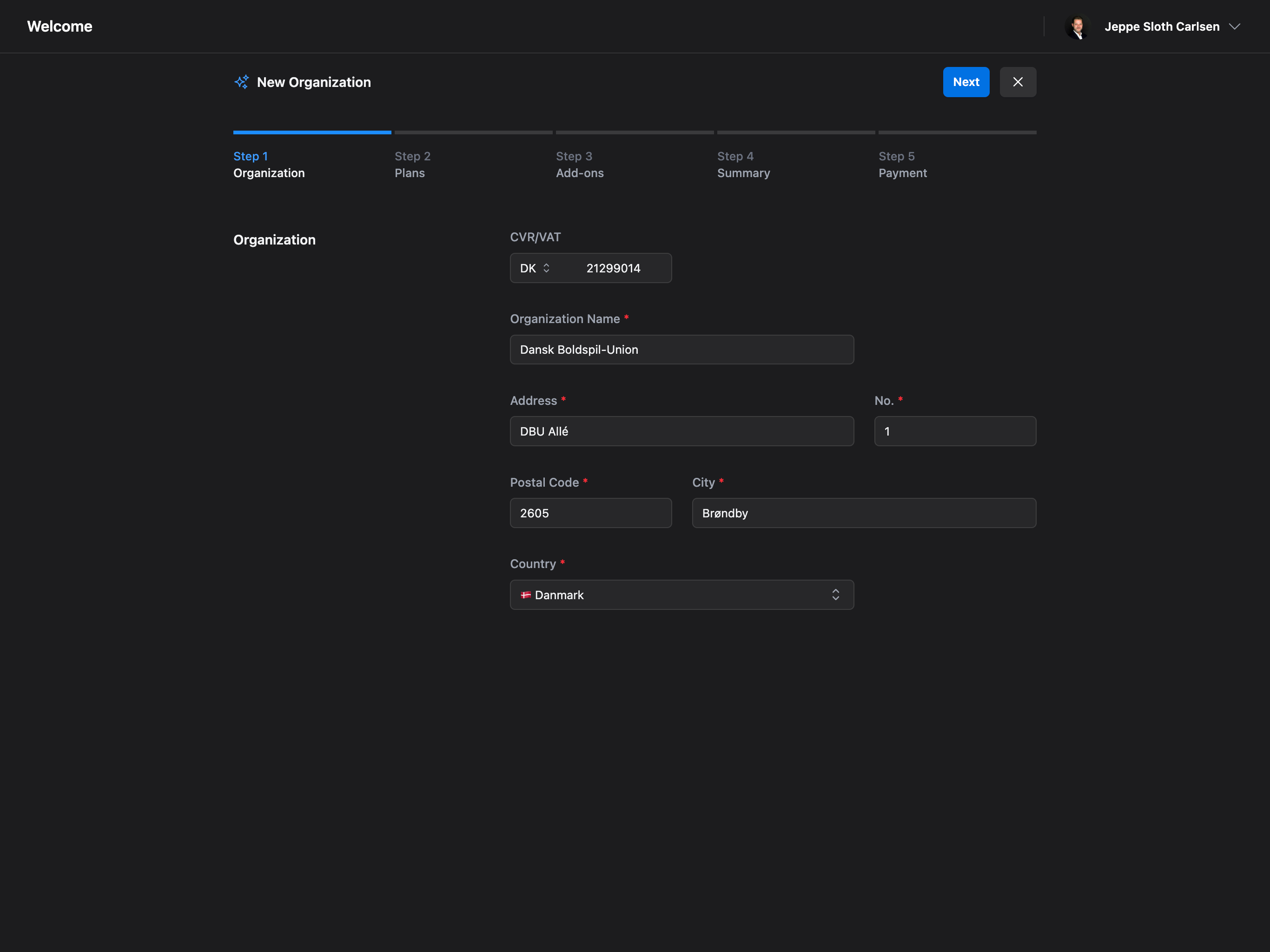
Once logged in, you'll be guided through a 5-step onboarding process to set up your organization.
### Organization Details
Enter your organization information:
* **CVR/VAT Number** - Your company registration number
* **Organization Name** - Your company or club name
* **Address** - Street name, number, postal code, city, and country
## Step 2: Set Up Your Organization
Once logged in, you'll be guided through a 5-step onboarding process to set up your organization.
### Organization Details
Enter your organization information:
* **CVR/VAT Number** - Your company registration number
* **Organization Name** - Your company or club name
* **Address** - Street name, number, postal code, city, and country
 ### Choose Your Plan
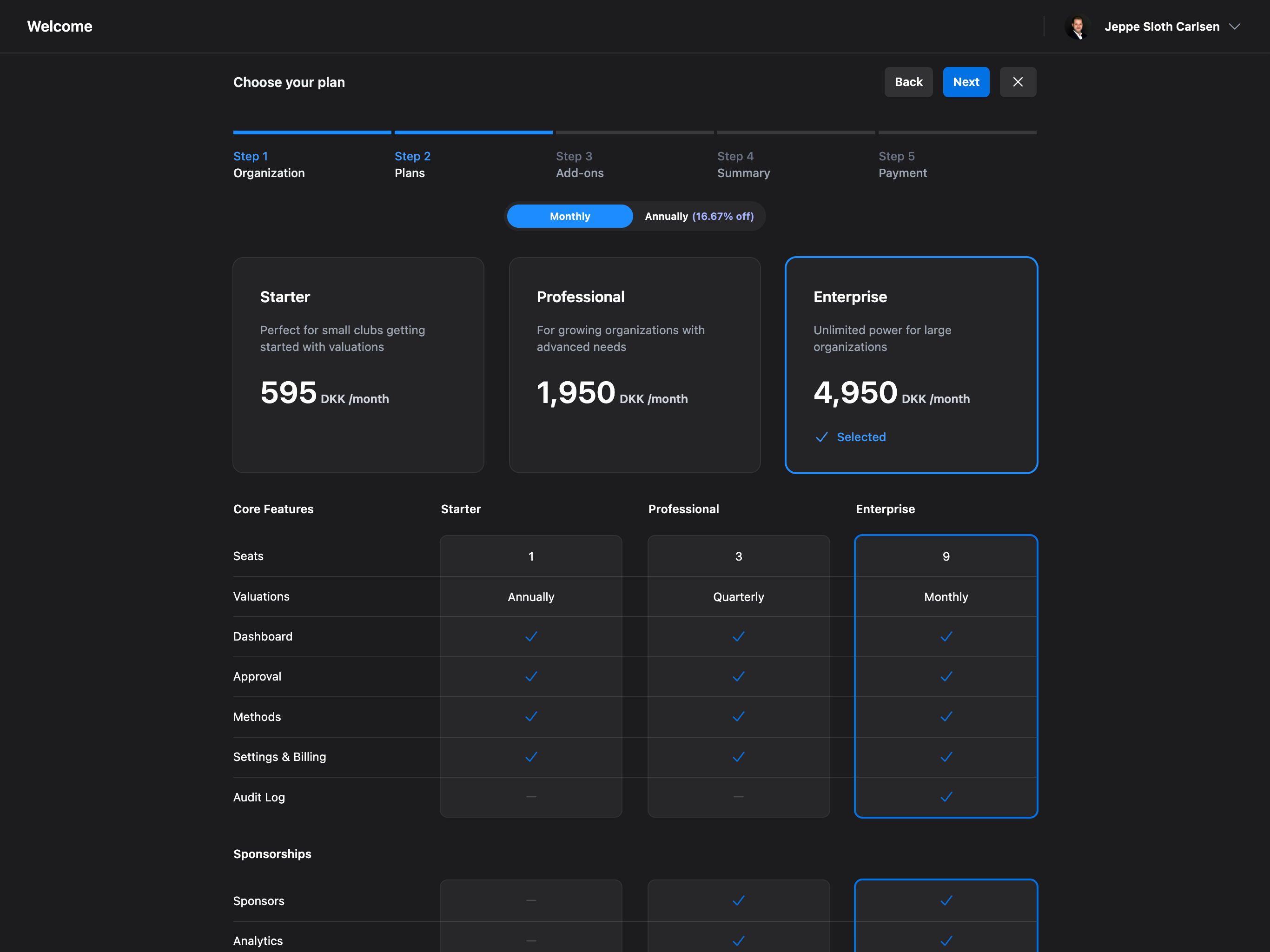
Select the plan that best fits your needs:
* **Starter** - Perfect for small clubs getting started with valuations
* **Professional** - For growing organizations with advanced needs (most popular)
* **Enterprise** - Unlimited power for large organizations
Choose between **monthly** or **annual** billing (save 16.67% with annual).
### Choose Your Plan
Select the plan that best fits your needs:
* **Starter** - Perfect for small clubs getting started with valuations
* **Professional** - For growing organizations with advanced needs (most popular)
* **Enterprise** - Unlimited power for large organizations
Choose between **monthly** or **annual** billing (save 16.67% with annual).
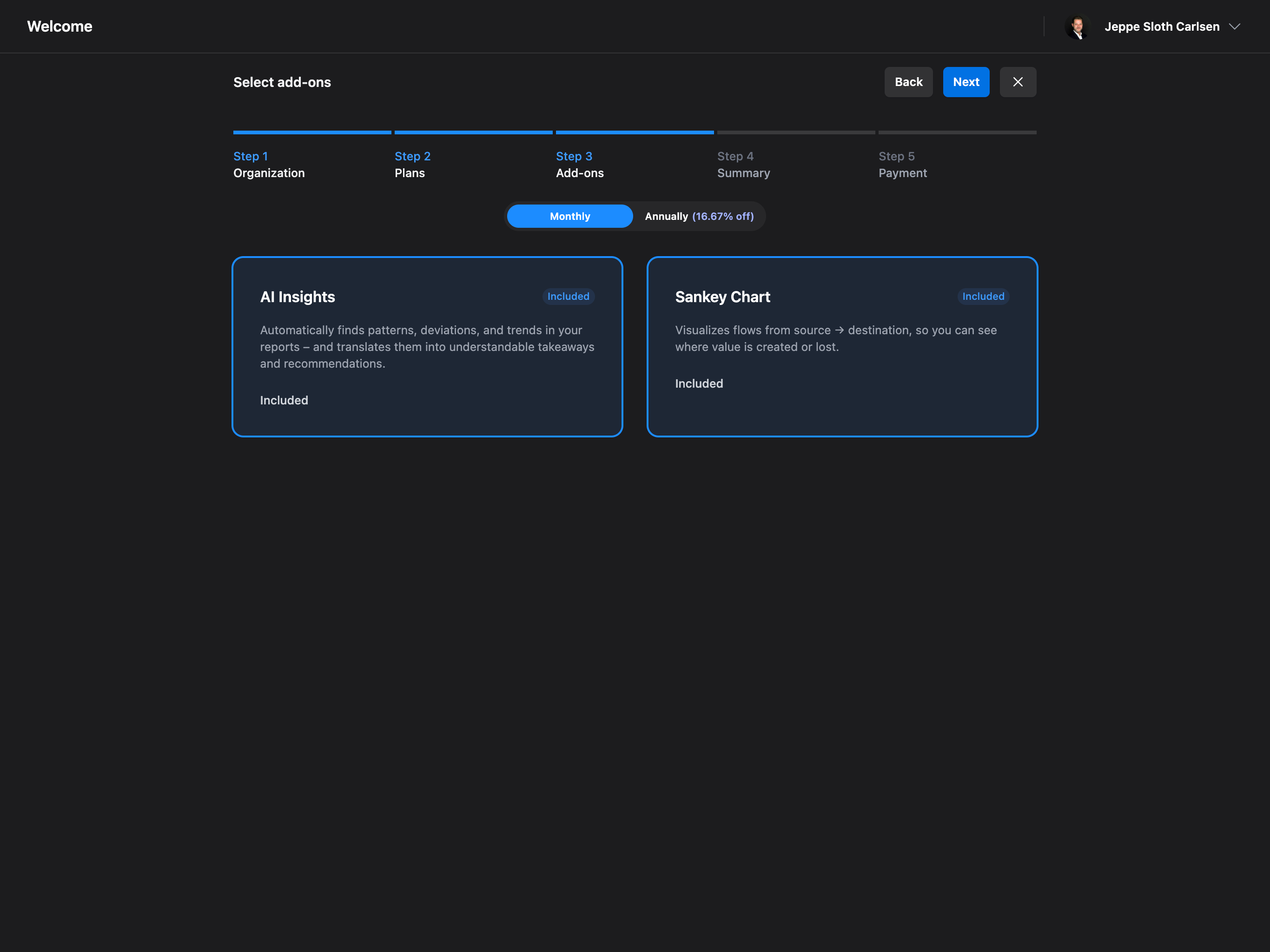
 ### Select Add-ons
Enhance your experience with optional add-ons:
* **AI Insights** - Automatically finds patterns, deviations, and trends in your reports
* **Sankey Chart** - Visualizes value flows from source to destination
### Select Add-ons
Enhance your experience with optional add-ons:
* **AI Insights** - Automatically finds patterns, deviations, and trends in your reports
* **Sankey Chart** - Visualizes value flows from source to destination
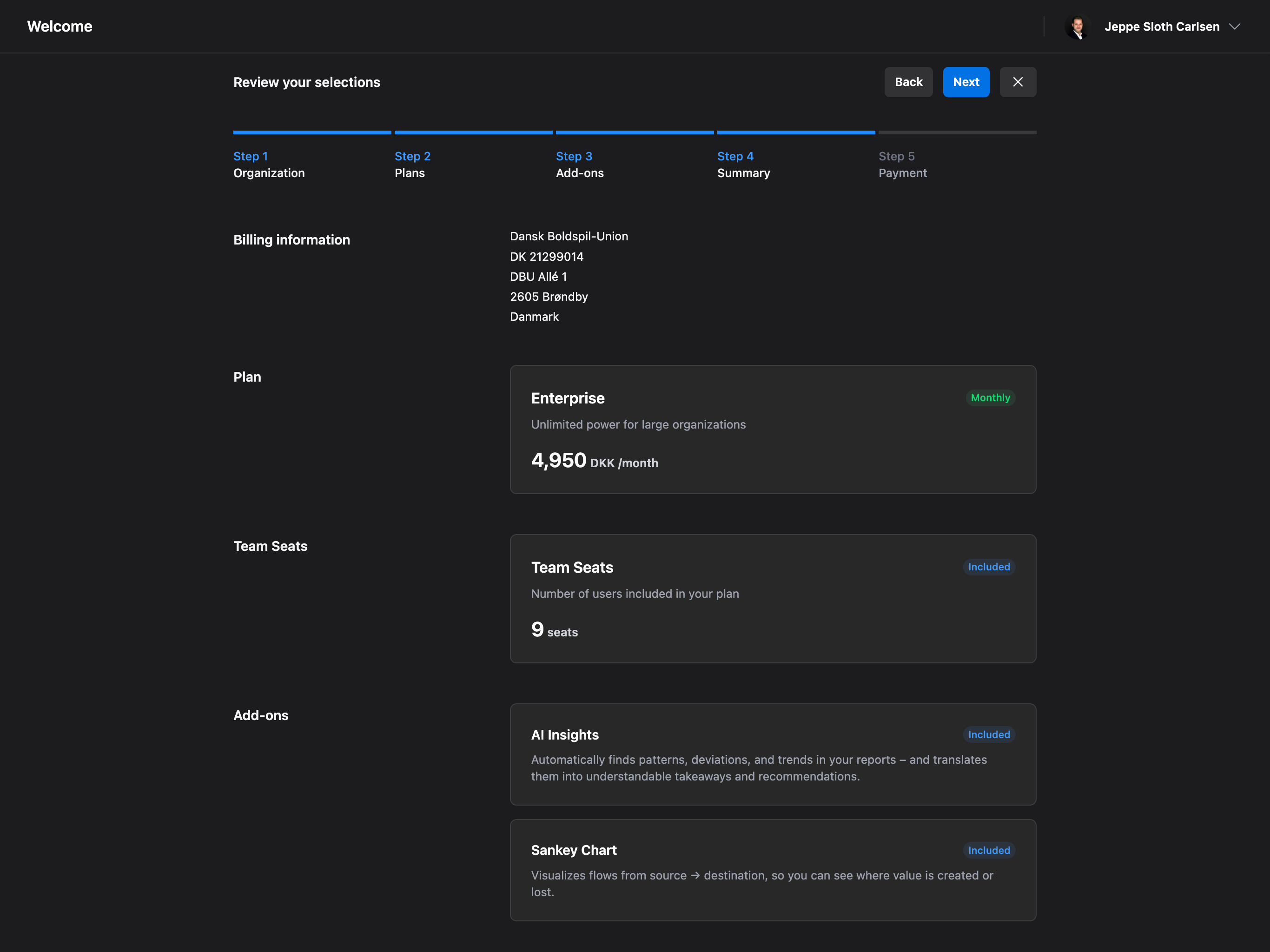
 ### Review Your Order
Review your selections and apply any discount codes if you have them.
### Review Your Order
Review your selections and apply any discount codes if you have them.
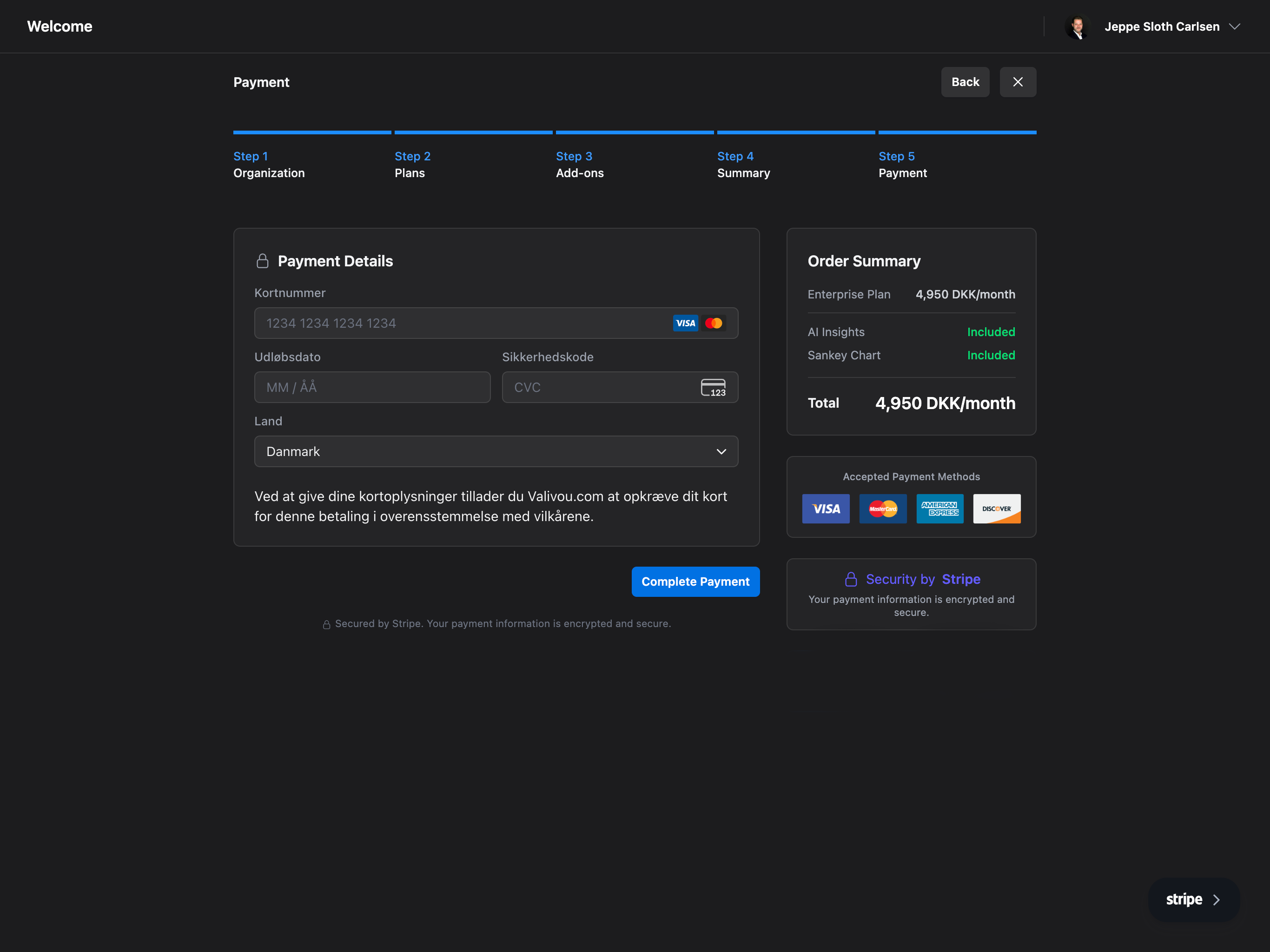
 ### Payment
Complete payment through Stripe's secure checkout.
### Payment
Complete payment through Stripe's secure checkout.
 ## What's Next?
Once your organization is set up, you'll be redirected to your dashboard where you can:
Start calculating sponsorship value with our valuation tool
Add your team and collaborate on valuations
Manage your sponsors and sponsorship packages
Configure your organization settings
## Frequently Asked Questions
The entire Valiyou onboarding process takes approximately 5 minutes to complete. This includes creating your account, verifying your email, entering organization details, selecting a subscription plan, choosing add-ons, and completing payment. Once finished, you'll have immediate access to your dashboard and can start creating valuations right away.
Yes, you can upgrade or downgrade your subscription plan at any time from **Platform → Billing →
Plans**. When upgrading, changes take effect immediately and you'll be prorated for the remaining
billing period. When downgrading, changes apply at the end of your current billing cycle to ensure
you get full value from your current plan.
Valiyou uses Stripe for secure payment processing and accepts all major credit cards (Visa,
Mastercard, American Express, Discover), debit cards, and various local payment methods depending
on your region. All payments are PCI-compliant and encrypted. You can manage payment methods in
**Platform → Billing → Payment Methods**.
Valiyou offers a trial period for new users to explore the platform features. Check our pricing
page or contact our sales team for current trial offers. During the trial, you'll have access to
core features including valuations, sponsorship management, and basic reporting to evaluate if
Valiyou fits your organization's needs.
Email verification is required to access your Valiyou account fully. Without verification, you may
have limited access to features and won't receive important notifications about valuations, team
collaboration, or billing updates. If you didn't receive the verification email, check your spam
folder or request a new verification email from the login page.
The VAT/CVR number is required for organizations subject to VAT regulations and helps ensure
proper invoicing. If your organization is not VAT-registered (such as some non-profits or
organizations in certain jurisdictions), you can enter "N/A" or contact support for assistance
with account setup.
The Starter plan includes essential valuation tools and basic reporting for small teams.
Professional adds advanced analytics, unlimited valuations, team collaboration features, and
priority support. Enterprise provides everything in Professional plus custom integrations,
dedicated support, unlimited users, and advanced security features. View detailed feature
comparisons on our pricing page.
AI Insights automatically analyzes your valuation data to identify trends, outliers, and
opportunities that might otherwise be missed, saving hours of manual analysis. The Sankey Chart
provides visual flow diagrams showing how sponsorship value moves through your organization,
making presentations to stakeholders more impactful. Both add-ons are particularly valuable for
Professional and Enterprise users managing complex sponsorship portfolios.
Yes, you can cancel your Valiyou subscription at any time from **Platform → Billing → Cancel
Subscription**. For monthly plans, cancellation takes effect at the end of the current billing
period. For annual plans, you'll retain access until the end of your paid year. You can export all
your data before cancellation to ensure you don't lose any valuations or reports.
Valiyou offers multiple support channels during onboarding. Access our comprehensive knowledge base, watch video tutorials, use the in-app chat support for instant help, or email [support@valiyou.com](mailto:support@valiyou.com). Professional and Enterprise customers also have access to dedicated onboarding specialists who can provide personalized setup assistance and training sessions.
## What's Next?
Once your organization is set up, you'll be redirected to your dashboard where you can:
Start calculating sponsorship value with our valuation tool
Add your team and collaborate on valuations
Manage your sponsors and sponsorship packages
Configure your organization settings
## Frequently Asked Questions
The entire Valiyou onboarding process takes approximately 5 minutes to complete. This includes creating your account, verifying your email, entering organization details, selecting a subscription plan, choosing add-ons, and completing payment. Once finished, you'll have immediate access to your dashboard and can start creating valuations right away.
Yes, you can upgrade or downgrade your subscription plan at any time from **Platform → Billing →
Plans**. When upgrading, changes take effect immediately and you'll be prorated for the remaining
billing period. When downgrading, changes apply at the end of your current billing cycle to ensure
you get full value from your current plan.
Valiyou uses Stripe for secure payment processing and accepts all major credit cards (Visa,
Mastercard, American Express, Discover), debit cards, and various local payment methods depending
on your region. All payments are PCI-compliant and encrypted. You can manage payment methods in
**Platform → Billing → Payment Methods**.
Valiyou offers a trial period for new users to explore the platform features. Check our pricing
page or contact our sales team for current trial offers. During the trial, you'll have access to
core features including valuations, sponsorship management, and basic reporting to evaluate if
Valiyou fits your organization's needs.
Email verification is required to access your Valiyou account fully. Without verification, you may
have limited access to features and won't receive important notifications about valuations, team
collaboration, or billing updates. If you didn't receive the verification email, check your spam
folder or request a new verification email from the login page.
The VAT/CVR number is required for organizations subject to VAT regulations and helps ensure
proper invoicing. If your organization is not VAT-registered (such as some non-profits or
organizations in certain jurisdictions), you can enter "N/A" or contact support for assistance
with account setup.
The Starter plan includes essential valuation tools and basic reporting for small teams.
Professional adds advanced analytics, unlimited valuations, team collaboration features, and
priority support. Enterprise provides everything in Professional plus custom integrations,
dedicated support, unlimited users, and advanced security features. View detailed feature
comparisons on our pricing page.
AI Insights automatically analyzes your valuation data to identify trends, outliers, and
opportunities that might otherwise be missed, saving hours of manual analysis. The Sankey Chart
provides visual flow diagrams showing how sponsorship value moves through your organization,
making presentations to stakeholders more impactful. Both add-ons are particularly valuable for
Professional and Enterprise users managing complex sponsorship portfolios.
Yes, you can cancel your Valiyou subscription at any time from **Platform → Billing → Cancel
Subscription**. For monthly plans, cancellation takes effect at the end of the current billing
period. For annual plans, you'll retain access until the end of your paid year. You can export all
your data before cancellation to ensure you don't lose any valuations or reports.
Valiyou offers multiple support channels during onboarding. Access our comprehensive knowledge base, watch video tutorials, use the in-app chat support for instant help, or email [support@valiyou.com](mailto:support@valiyou.com). Professional and Enterprise customers also have access to dedicated onboarding specialists who can provide personalized setup assistance and training sessions.