> ## Documentation Index
> Fetch the complete documentation index at: https://docs.valiyou.com/llms.txt
> Use this file to discover all available pages before exploring further.
# API
> Create and manage API keys for programmatic access to your Valiyou data
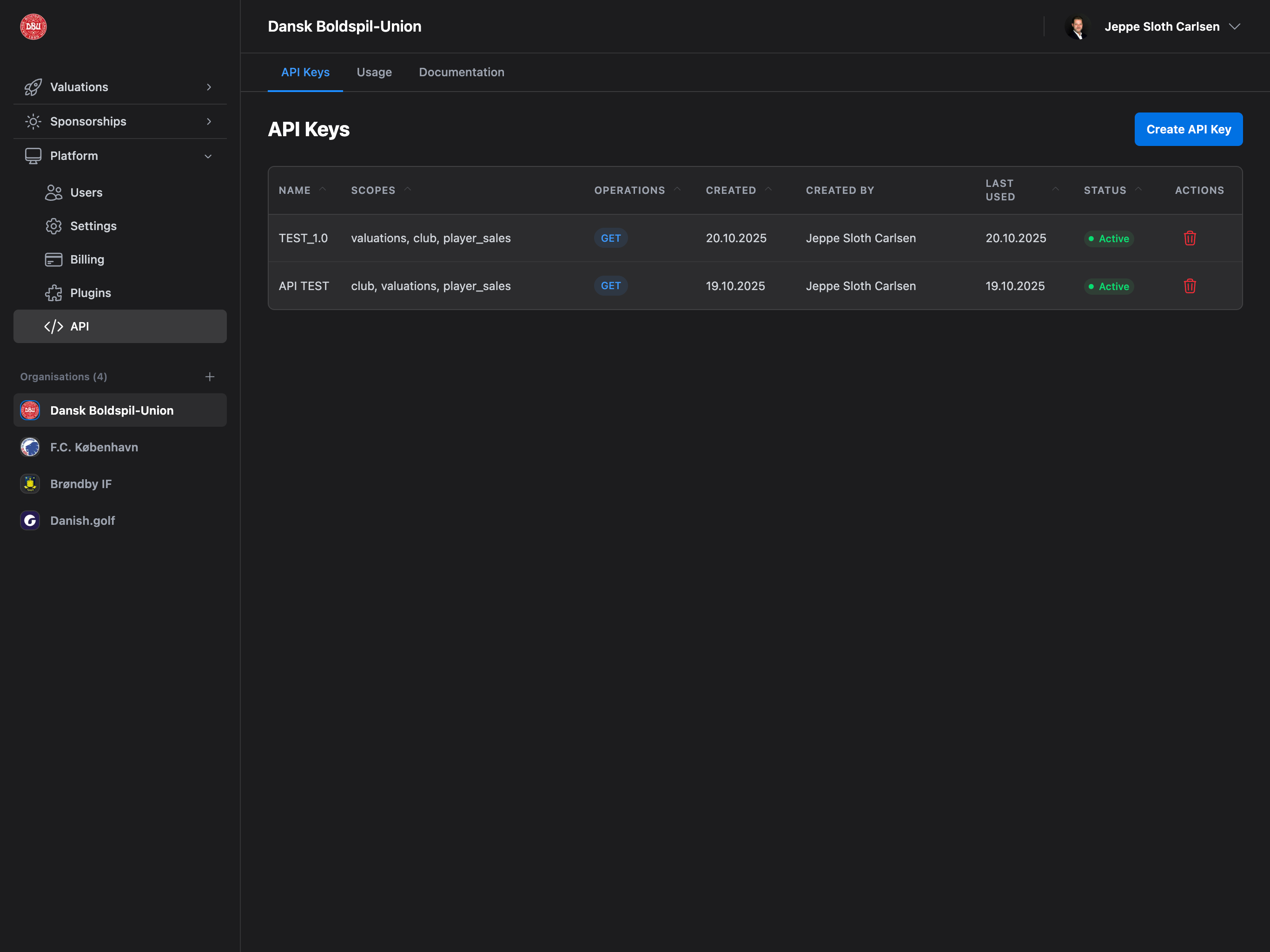 Integrate Valiyou data into your workflows with REST API access. Create API keys, monitor usage, and explore endpoint documentation.
## Accessing API Management
Navigate to **Platform** → **API** from the sidebar to manage your API keys.
**Permission Required**: API permission or Admin access required to create and manage API keys.
## Page Layout
The API Management page has 3 tabs:
### API Keys Tab
* **View**: All API keys with details (name, scopes, operations, status)
* **Create**: Generate new API keys with custom permissions
* **Revoke**: Delete API keys to remove access
### Usage Tab
* **Charts**: Visual analytics of API usage over time (30 days)
* **Metrics**: Total requests, success rate, response time
* **Endpoints**: Breakdown of requests per endpoint
### Documentation Tab
* **Integration Guides**: Power BI, Excel integration steps
* **Authentication**: How to use API keys in requests
* **Operations**: HTTP methods (GET, POST, PUT, DELETE)
* **Endpoints**: Complete API reference with examples
## API Keys Tab
### API Keys Table
Comprehensive table showing all active and inactive API keys.
**Columns:**
* **Name**: API key name (descriptive identifier)
* **Scopes**: Resources the key can access (valuations, player-sales, clubs)
* **Operations**: HTTP methods allowed (GET, POST, PUT, DELETE) with color chips
* Blue (GET) - Read
* Green (POST) - Create
* Yellow (PUT) - Update
* Red (DELETE) - Delete
* **Created**: Date key was created
* **Created By**: User who created the key (name or email)
* **Last Used**: Last time key was used (or "Never")
* **Status**: Active (green) or Inactive (gray) badge
* **Actions**: Revoke button (red trash icon)
**Operations Colors**: The table uses color-coded chips to quickly identify which operations each API key can perform.
### Empty State
When no API keys exist:
* **Icon**: Key icon
* **Title**: "No API keys yet"
* **Message**: "Create your first API key to get started"
* **Action**: Click "Create API Key" button in header
## Create API Key
Generate a new API key with custom name, description, scopes, and operations.
### Opening Create Modal
**Triggers:**
* Click **"Create API Key"** button (page header, top right)
* Available on all tabs (button always visible)
**Demo Mode:**
* If in demo mode, shows "Upgrade Required" modal instead
* Must upgrade to paid plan to create API keys
### Create API Key Modal
**Modal Structure:**
* **Title**: "Create API Key"
* **Close button**: X (top right)
* **Form fields**: Name, Description, Scopes, Operations
* **Action buttons**: Cancel, Create API Key
#### Form Fields
**1. Name** (Required):
* **Label**: "Key Name"
* **Placeholder**: "My Integration Key"
* **Validation**:
* Required field
* Must be unique (checks against existing keys)
* Max 50 characters
**2. Description** (Optional):
* **Label**: "Description"
* **Placeholder**: "What this key will be used for..."
* **Helper**: "Describe the purpose of this API key"
* **Max**: 200 characters
**3. Scopes** (Required):
* **Label**: "Scopes"
* **Helper**: "Select which resources this key can access"
* **Options**: Checkboxes for each scope
* ☑ **Valuations** - Access valuation data
* ☑ **Player Sales** - Access player transfer data
* ☑ **Clubs** - Access club information
* **Validation**: At least one scope required
**4. Operations** (Required):
* **Label**: "Operations"
* **Helper**: "Select which HTTP operations this key can perform"
* **Options**: Checkboxes for each operation
* ☑ **GET (Read)** - Retrieve data
* ☑ **POST (Create)** - Create new records
* ☑ **PUT (Update)** - Modify existing records
* ☑ **DELETE (Delete)** - Remove records
* **Validation**: At least one operation required
**Least Privilege Principle**: Only grant the scopes and operations that are actually needed. For read-only integrations (e.g., Power BI, Excel), only enable GET operation.
### API Key Creation Process
**Step 1: Fill Form**
1. Enter unique key name
2. Add optional description
3. Select scopes (resources)
4. Select operations (HTTP methods)
5. Click **"Create API Key"**
**Step 2: Key Generated**
* API key is generated and displayed in a modal
* **Format**: `vly_` (e.g., `vly_abc123def456...`)
* **Copy Button**: Click to copy key to clipboard
* **Important Warning**: "This is the only time you'll see this key. Copy it now and store it securely."
**Step 3: Save Key Securely**
* Store key in password manager or secure storage
* **Never** commit to version control
* **Never** share publicly
* Cannot view key again after closing modal
**Step 4: Key Added to Table**
* New key appears in API Keys table
* Status: Active (green badge)
* Last Used: Never (not yet used)
* All selected scopes and operations visible
**Security Best Practice**: Treat API keys like passwords. If a key is compromised, revoke it immediately and create a new one.
## Revoking API Keys
Remove access by deleting an API key.
### Revoke Process
**Step 1: Click Revoke**
1. Find API key in table
2. Click **red trash icon** (Actions column)
3. Confirmation modal appears
**Step 2: Confirm Deletion**
* **Title**: "Revoke API Key"
* **Message**: "Are you sure you want to revoke the API key '\[Name]'? This action cannot be undone and any applications using this key will immediately lose access."
* **Buttons**:
* **Revoke** (red, destructive)
* **Cancel** (gray)
**Step 3: Key Revoked**
* API key deleted from database
* Key removed from table
* All requests using this key will fail with 401 Unauthorized
**Immediate Effect**: Revoking a key immediately blocks all applications using it. Make sure to update your integrations before revoking.
## Usage Tab
Monitor API usage with visual analytics and metrics.
### Requests Over Time Chart
**Line Chart** showing API requests for the last 30 days.
**Features:**
* **X-axis**: Date (last 30 days)
* **Y-axis**: Number of requests
* **Line**: Blue line with dots for each day
* **Hover**: Tooltip shows exact request count
* **Grid**: Cartesian grid for easy reading
**Empty State:**
* **Icon**: Chart icon
* **Title**: "No API usage data yet"
* **Message**: "Start making API requests to see usage statistics"
### Summary Metrics Cards
Three metric cards showing key statistics:
**1. Total Requests**
* **Value**: Total API requests (last 30 days)
* **Change**: Percentage increase/decrease from previous period
* **Trend**: Up (green) or Down (red) indicator
**2. Success Rate**
* **Value**: Percentage of successful requests (200-299 status)
* **Format**: "98.5%"
* **No trend indicator**
**3. Avg Response Time**
* **Value**: Average API response time in milliseconds
* **Format**: "125ms"
* **No trend indicator**
**Success Rate**: A healthy API should have >95% success rate. Lower rates may indicate authentication issues, invalid requests, or rate limiting.
### Requests by Endpoint
Breakdown showing which endpoints are most used.
**For Each Endpoint:**
* **Endpoint**: Full endpoint path (e.g., `/api/v1/valuations`)
* **Request Count**: Number of requests
* **Success Rate**: Percentage successful (green text)
* **Progress Bar**: Visual representation of usage (width = % of total)
**Sorting**: Endpoints sorted by request count (descending)
**Empty**: If no usage data, section is hidden
## Documentation Tab
Complete API reference with integration guides and endpoint documentation.
### Integration Guides
Step-by-step guides for popular tools.
#### Power BI Integration
**Icon**: Yellow chart icon
**Steps**:
1. Open Power BI Desktop
2. Get Data → Web
3. Enter API URL with your API key
4. Transform data as needed
5. Create visualizations
#### Excel Integration
**Icon**: Green table icon
**Steps**:
1. Data → Get Data → From Web
2. Enter API URL
3. Power Query Editor opens
4. Load to worksheet
**Power BI & Excel**: Both tools support automatic data refresh. Set up scheduled refresh to keep your reports up-to-date with latest Valiyou data.
### Authentication
All API requests require authentication with an API key.
**Method**: Query Parameter
**Format**:
```
?api_key=YOUR_API_KEY&club_id=YOUR_CLUB_ID
```
**Example**:
```
https://valiyou.com/api/v1/valuations?api_key=vly_abc123&club_id=org_xyz789
```
**Requirements**:
* `api_key` - Your API key (required)
* `club_id` - Your organization ID (required)
**Security**: Always use HTTPS when making API requests. Never send API keys over unencrypted connections.
### HTTP Operations
API keys can be configured with different operation permissions:
#### GET (Read)
* **Method**: GET
* **Chip Color**: Blue
* **Purpose**: Retrieve and read data from your organization
* **Use Case**: Read-only integrations (Power BI, Excel, analytics)
#### POST (Create)
* **Method**: POST
* **Chip Color**: Green
* **Purpose**: Create new records in your organization
* **Use Case**: Automated data entry, imports
#### PUT (Update)
* **Method**: PUT
* **Chip Color**: Yellow
* **Purpose**: Update existing records in your organization
* **Use Case**: Data synchronization, corrections
#### DELETE (Delete)
* **Method**: DELETE
* **Chip Color**: Red
* **Purpose**: Delete records from your organization
* **Use Case**: Cleanup, data management
**Operation Permissions**: Each API key can have different operations enabled. For security, only grant operations that are needed.
### API Endpoints
Complete reference for all available endpoints.
***
#### GET /api/v1/clubs
Get club information (name, address, base currency).
**Parameters**:
* `api_key` (string, required) - Your API key
* `club_id` (string, required) - Your club ID
**Response Fields**:
* `name` (string) - Club name
* `address` (string) - Full club address (street, postal code, city, country)
* `base_currency` (string) - Base currency code (e.g., EUR, USD, DKK)
**Example Request**:
```bash theme={null}
curl -X GET "https://valiyou.com/api/v1/clubs?api_key=YOUR_API_KEY&club_id=YOUR_CLUB_ID"
```
**Example Response**:
```json theme={null}
{
"name": "FC Example",
"address": "123 Stadium Road, 12345 City, Country",
"base_currency": "EUR"
}
```
***
#### GET /api/v1/valuations
Get all valuations for your organization.
**Parameters**:
* `api_key` (string, required) - Your API key
* `club_id` (string, required) - Your club ID
* `from_date` (string, optional) - Filter from date (YYYY-MM-DD)
* `to_date` (string, optional) - Filter to date (YYYY-MM-DD)
**Response Fields** (array of valuations):
* `id` (string) - Valuation unique ID
* `club_id` (string) - Club ID
* `valuation_date` (string) - Date of the valuation (YYYY-MM-DD)
* `created_at` (string) - Creation timestamp
* `merch_revenue` (number) - Merchandise revenue
* `matchday_revenue` (number) - Matchday revenue
* `player_sales_value` (number) - Total player sales value
* `tv_duration_min` (number) - TV exposure duration in minutes
* `tv_size_category` (string) - TV logo size (S, M, L, XL)
* `tv_cpm` (number) - TV cost per thousand impressions
* `tv_viewers` (number) - TV viewers count
* `webtv_views` (number) - Web TV views
* `webtv_cpm` (number) - Web TV CPM
* `pr_reach` (number) - PR reach
* `pr_cpm` (number) - PR CPM
* `digital_impressions` (number) - Digital impressions
* `digital_cpm` (number) - Digital CPM
* `social_followers` (number) - Social media followers
* `social_followers_cpm` (number) - Social followers CPM
* `social_impressions` (number) - Social media impressions
* `social_impressions_cpm` (number) - Social impressions CPM
* `social_engagements` (number) - Social media engagements
* `social_cpm` (number) - Social engagements CPM
* `attendance` (number) - Match attendance
* `attendance_cpm` (number) - Attendance CPM
* `hospitality_guests` (number) - Hospitality guests count
* `hospitality_value_per_guest` (number) - Value per hospitality guest
* `brand_popularity` (number) - Brand popularity score (1-10)
* `brand_csr` (number) - Brand CSR score (1-10)
* `brand_culture` (number) - Brand culture score (1-10)
* `brand_loyalty` (number) - Brand loyalty score (1-10)
* `calculated_sales_value` (number) - Calculated total sales value
* `calculated_media_value` (number) - Calculated total media value
* `qualitative_multiplier` (number) - Brand quality multiplier
* `final_total_value` (number) - Final total attention valuation
**Example Request**:
```bash theme={null}
curl -X GET "https://valiyou.com/api/v1/valuations?api_key=YOUR_API_KEY&club_id=YOUR_CLUB_ID"
```
**Example Request with Date Filter**:
```bash theme={null}
curl -X GET "https://valiyou.com/api/v1/valuations?api_key=YOUR_API_KEY&club_id=YOUR_CLUB_ID&from_date=2024-01-01&to_date=2024-12-31"
```
***
#### GET /api/v1/player-sales
Get all player sales with valuation information.
**Parameters**:
* `api_key` (string, required) - Your API key
* `club_id` (string, required) - Your club ID
* `from_date` (string, optional) - Filter from date (YYYY-MM-DD)
* `to_date` (string, optional) - Filter to date (YYYY-MM-DD)
**Response Fields** (array of player sales):
* `id` (string) - Player sale unique ID
* `valuation_id` (string) - Associated valuation ID
* `valuation_date` (string) - Date of the valuation (YYYY-MM-DD)
* `player_name` (string) - Name of the player
* `sale_value` (number) - Sale/transfer value
* `created_at` (string) - Creation timestamp
* `updated_at` (string) - Last update timestamp
**Example Request**:
```bash theme={null}
curl -X GET "https://valiyou.com/api/v1/player-sales?api_key=YOUR_API_KEY&club_id=YOUR_CLUB_ID"
```
***
## Rate Limits
API usage is monitored but not currently rate-limited for paid accounts.
**Current Status**:
* ✅ **Unlimited Requests**: No rate limits for Professional/Enterprise plans
* ⚠️ **Fair Use**: Excessive usage may be flagged for review
* 📊 **Monitoring**: All requests are logged for usage analytics
**Future Rate Limits** (not yet implemented):
* Potential per-minute or per-hour limits
* Different tiers based on plan
* Will be communicated in advance if implemented
**Best Practice**: Implement exponential backoff and retry logic in your integrations. This ensures your applications remain resilient if rate limits are introduced in the future.
## Error Handling
API returns standard HTTP status codes.
### Success Responses
* **200 OK** - Request successful, data returned
* **201 Created** - Resource created successfully (POST)
* **204 No Content** - Request successful, no data returned (DELETE)
### Client Errors (4xx)
* **400 Bad Request** - Invalid request format or parameters
* **401 Unauthorized** - Invalid or missing API key
* **403 Forbidden** - API key doesn't have required scope/operation
* **404 Not Found** - Endpoint or resource doesn't exist
* **429 Too Many Requests** - Rate limit exceeded (if implemented)
### Server Errors (5xx)
* **500 Internal Server Error** - Unexpected server error
* **503 Service Unavailable** - Temporary service disruption
**Error Response Format**:
```json theme={null}
{
"error": "Unauthorized",
"message": "Invalid API key provided"
}
```
**401 Unauthorized**: This usually means your API key is invalid, revoked, or missing. Verify your key and ensure it hasn't been revoked.
## Permissions
Access to API Management requires specific permissions:
| Permission | Can View | Can Create Keys | Can Revoke Keys | Can View Usage |
| --------------- | -------- | --------------- | --------------- | -------------- |
| **Admin** | ✅ Yes | ✅ Yes | ✅ Yes | ✅ Yes |
| **API** | ✅ Yes | ✅ Yes | ✅ Yes | ✅ Yes |
| **Other Roles** | ❌ No | ❌ No | ❌ No | ❌ No |
**API Permission**: Users with API permission have full access to create, view, and revoke keys. This is equivalent to Admin access for the API Management page.
## Common Use Cases
### Power BI Integration
1. Navigate to **Platform** → **API**
2. Click **"Create API Key"**
3. Enter name: "Power BI Dashboard"
4. Description: "Read-only access for Power BI reports"
5. Select scopes: ☑ Valuations, ☑ Player Sales, ☑ Clubs
6. Select operations: ☑ GET (Read only)
7. Click **"Create API Key"**
8. Copy generated key (e.g., `vly_abc123...`)
9. Store key securely
10. Open Power BI Desktop
11. Get Data → Web
12. Enter URL: `https://valiyou.com/api/v1/valuations?api_key=vly_abc123&club_id=org_xyz`
13. Transform data in Power Query
14. Create visualizations
### Excel Integration
1. Create API key (same as Power BI steps 1-9)
2. Open Excel
3. Data → Get Data → From Web
4. Enter URL with API key and club ID
5. Power Query Editor opens
6. Transform data as needed
7. Click **"Close & Load"** to load to worksheet
8. Set up automatic refresh (optional)
### Data Export for Analysis
1. Create API key with GET operation
2. Use curl or programming language to fetch data:
```bash theme={null}
curl "https://valiyou.com/api/v1/valuations?api_key=YOUR_KEY&club_id=YOUR_ID" > valuations.json
```
3. Process JSON data in your analytics tool
4. Schedule regular exports with cron job or task scheduler
### Automated Data Entry
1. Create API key with POST operation
2. Select specific scopes (e.g., Valuations)
3. Build integration to create valuations automatically:
```bash theme={null}
curl -X POST "https://valiyou.com/api/v1/valuations?api_key=YOUR_KEY&club_id=YOUR_ID" \
-H "Content-Type: application/json" \
-d '{"valuation_date": "2024-01-15", "merch_revenue": 50000, ...}'
```
## Troubleshooting
### Can't Access API Page
**Reasons**:
* No API permission
* Not an Admin
**Fix**:
* Request API permission from Admin
* Ask owner to grant Admin role
### Can't Create API Key (Demo Mode)
**Reasons**:
* Organization is in demo mode
* Free trial expired
**Fix**:
* Upgrade to paid plan: [Platform → Billing](/platform/billing/billing)
* Contact sales for Enterprise plan
### 401 Unauthorized Errors
**Reasons**:
* API key invalid or typo
* API key revoked
* API key not included in request
* Using wrong club\_id
**Check**:
* Verify API key is correct (copy-paste carefully)
* Check if key is still active in API Keys table
* Ensure `api_key` parameter is in URL
* Verify `club_id` matches your organization
**Fix**:
* Create new API key if current one is revoked
* Double-check URL format and parameters
* Test with curl to isolate integration issues
### 403 Forbidden Errors
**Reasons**:
* API key doesn't have required scope
* API key doesn't have required operation
* Trying to access another organization's data
**Check**:
* Review key's scopes in API Keys table
* Review key's operations in API Keys table
* Verify club\_id matches your organization
**Fix**:
* Create new API key with required scopes/operations
* Or revoke old key and create replacement with broader permissions
### No Data Returned (Empty Array)
**Reasons**:
* No data matches filter criteria
* Date range filter too restrictive
* Organization has no valuations yet
**Check**:
* Remove date filters and try again
* Verify organization has created valuations
* Check if data exists in Valiyou platform
**Fix**:
* Adjust date range: `from_date` and `to_date` parameters
* Create valuations if none exist
* Test with `/api/v1/clubs` endpoint to verify connectivity
### Usage Statistics Not Showing
**Reasons**:
* No API requests made yet
* Statistics cache not updated (updates every 5 minutes)
* Network error fetching usage data
**Try**:
* Make some API requests first
* Wait 5 minutes for cache to refresh
* Refresh browser page
* Check browser console for errors
## Security Best Practices
**API Key Management**:
* ✅ Create separate keys for each integration
* ✅ Use descriptive names (e.g., "Power BI Production", "Excel Finance")
* ✅ Grant minimum required scopes and operations
* ✅ Store keys in password managers or environment variables
* ✅ Revoke unused or compromised keys immediately
* ❌ Never commit keys to version control
* ❌ Never share keys via email or chat
* ❌ Never log keys in application logs
**Integration Security**:
* ✅ Always use HTTPS for API requests
* ✅ Implement error handling for failed requests
* ✅ Use retry logic with exponential backoff
* ✅ Monitor API usage regularly
* ❌ Don't hardcode keys in application code
* ❌ Don't expose keys in client-side JavaScript
* ❌ Don't reuse keys across environments (dev/staging/prod)
**Auditing**:
* Review API keys quarterly
* Remove keys for terminated integrations
* Check "Last Used" column for inactive keys
* Monitor "Usage" tab for unusual activity
**Security Audit**: Set a calendar reminder to review your API keys every 3 months. Revoke any keys that are no longer needed or haven't been used recently.
## Next Steps
Start by creating a read-only key for Power BI or Excel
Use curl to test API responses before building integrations
Check Usage tab regularly to understand API usage patterns
Read complete API reference and integration guides
Use API keys to automate data flows and reporting
**Support**: Need help with API integration? Contact support at [support@valiyou.com](mailto:support@valiyou.com) with your use case and we'll help you get started.
Integrate Valiyou data into your workflows with REST API access. Create API keys, monitor usage, and explore endpoint documentation.
## Accessing API Management
Navigate to **Platform** → **API** from the sidebar to manage your API keys.
**Permission Required**: API permission or Admin access required to create and manage API keys.
## Page Layout
The API Management page has 3 tabs:
### API Keys Tab
* **View**: All API keys with details (name, scopes, operations, status)
* **Create**: Generate new API keys with custom permissions
* **Revoke**: Delete API keys to remove access
### Usage Tab
* **Charts**: Visual analytics of API usage over time (30 days)
* **Metrics**: Total requests, success rate, response time
* **Endpoints**: Breakdown of requests per endpoint
### Documentation Tab
* **Integration Guides**: Power BI, Excel integration steps
* **Authentication**: How to use API keys in requests
* **Operations**: HTTP methods (GET, POST, PUT, DELETE)
* **Endpoints**: Complete API reference with examples
## API Keys Tab
### API Keys Table
Comprehensive table showing all active and inactive API keys.
**Columns:**
* **Name**: API key name (descriptive identifier)
* **Scopes**: Resources the key can access (valuations, player-sales, clubs)
* **Operations**: HTTP methods allowed (GET, POST, PUT, DELETE) with color chips
* Blue (GET) - Read
* Green (POST) - Create
* Yellow (PUT) - Update
* Red (DELETE) - Delete
* **Created**: Date key was created
* **Created By**: User who created the key (name or email)
* **Last Used**: Last time key was used (or "Never")
* **Status**: Active (green) or Inactive (gray) badge
* **Actions**: Revoke button (red trash icon)
**Operations Colors**: The table uses color-coded chips to quickly identify which operations each API key can perform.
### Empty State
When no API keys exist:
* **Icon**: Key icon
* **Title**: "No API keys yet"
* **Message**: "Create your first API key to get started"
* **Action**: Click "Create API Key" button in header
## Create API Key
Generate a new API key with custom name, description, scopes, and operations.
### Opening Create Modal
**Triggers:**
* Click **"Create API Key"** button (page header, top right)
* Available on all tabs (button always visible)
**Demo Mode:**
* If in demo mode, shows "Upgrade Required" modal instead
* Must upgrade to paid plan to create API keys
### Create API Key Modal
**Modal Structure:**
* **Title**: "Create API Key"
* **Close button**: X (top right)
* **Form fields**: Name, Description, Scopes, Operations
* **Action buttons**: Cancel, Create API Key
#### Form Fields
**1. Name** (Required):
* **Label**: "Key Name"
* **Placeholder**: "My Integration Key"
* **Validation**:
* Required field
* Must be unique (checks against existing keys)
* Max 50 characters
**2. Description** (Optional):
* **Label**: "Description"
* **Placeholder**: "What this key will be used for..."
* **Helper**: "Describe the purpose of this API key"
* **Max**: 200 characters
**3. Scopes** (Required):
* **Label**: "Scopes"
* **Helper**: "Select which resources this key can access"
* **Options**: Checkboxes for each scope
* ☑ **Valuations** - Access valuation data
* ☑ **Player Sales** - Access player transfer data
* ☑ **Clubs** - Access club information
* **Validation**: At least one scope required
**4. Operations** (Required):
* **Label**: "Operations"
* **Helper**: "Select which HTTP operations this key can perform"
* **Options**: Checkboxes for each operation
* ☑ **GET (Read)** - Retrieve data
* ☑ **POST (Create)** - Create new records
* ☑ **PUT (Update)** - Modify existing records
* ☑ **DELETE (Delete)** - Remove records
* **Validation**: At least one operation required
**Least Privilege Principle**: Only grant the scopes and operations that are actually needed. For read-only integrations (e.g., Power BI, Excel), only enable GET operation.
### API Key Creation Process
**Step 1: Fill Form**
1. Enter unique key name
2. Add optional description
3. Select scopes (resources)
4. Select operations (HTTP methods)
5. Click **"Create API Key"**
**Step 2: Key Generated**
* API key is generated and displayed in a modal
* **Format**: `vly_` (e.g., `vly_abc123def456...`)
* **Copy Button**: Click to copy key to clipboard
* **Important Warning**: "This is the only time you'll see this key. Copy it now and store it securely."
**Step 3: Save Key Securely**
* Store key in password manager or secure storage
* **Never** commit to version control
* **Never** share publicly
* Cannot view key again after closing modal
**Step 4: Key Added to Table**
* New key appears in API Keys table
* Status: Active (green badge)
* Last Used: Never (not yet used)
* All selected scopes and operations visible
**Security Best Practice**: Treat API keys like passwords. If a key is compromised, revoke it immediately and create a new one.
## Revoking API Keys
Remove access by deleting an API key.
### Revoke Process
**Step 1: Click Revoke**
1. Find API key in table
2. Click **red trash icon** (Actions column)
3. Confirmation modal appears
**Step 2: Confirm Deletion**
* **Title**: "Revoke API Key"
* **Message**: "Are you sure you want to revoke the API key '\[Name]'? This action cannot be undone and any applications using this key will immediately lose access."
* **Buttons**:
* **Revoke** (red, destructive)
* **Cancel** (gray)
**Step 3: Key Revoked**
* API key deleted from database
* Key removed from table
* All requests using this key will fail with 401 Unauthorized
**Immediate Effect**: Revoking a key immediately blocks all applications using it. Make sure to update your integrations before revoking.
## Usage Tab
Monitor API usage with visual analytics and metrics.
### Requests Over Time Chart
**Line Chart** showing API requests for the last 30 days.
**Features:**
* **X-axis**: Date (last 30 days)
* **Y-axis**: Number of requests
* **Line**: Blue line with dots for each day
* **Hover**: Tooltip shows exact request count
* **Grid**: Cartesian grid for easy reading
**Empty State:**
* **Icon**: Chart icon
* **Title**: "No API usage data yet"
* **Message**: "Start making API requests to see usage statistics"
### Summary Metrics Cards
Three metric cards showing key statistics:
**1. Total Requests**
* **Value**: Total API requests (last 30 days)
* **Change**: Percentage increase/decrease from previous period
* **Trend**: Up (green) or Down (red) indicator
**2. Success Rate**
* **Value**: Percentage of successful requests (200-299 status)
* **Format**: "98.5%"
* **No trend indicator**
**3. Avg Response Time**
* **Value**: Average API response time in milliseconds
* **Format**: "125ms"
* **No trend indicator**
**Success Rate**: A healthy API should have >95% success rate. Lower rates may indicate authentication issues, invalid requests, or rate limiting.
### Requests by Endpoint
Breakdown showing which endpoints are most used.
**For Each Endpoint:**
* **Endpoint**: Full endpoint path (e.g., `/api/v1/valuations`)
* **Request Count**: Number of requests
* **Success Rate**: Percentage successful (green text)
* **Progress Bar**: Visual representation of usage (width = % of total)
**Sorting**: Endpoints sorted by request count (descending)
**Empty**: If no usage data, section is hidden
## Documentation Tab
Complete API reference with integration guides and endpoint documentation.
### Integration Guides
Step-by-step guides for popular tools.
#### Power BI Integration
**Icon**: Yellow chart icon
**Steps**:
1. Open Power BI Desktop
2. Get Data → Web
3. Enter API URL with your API key
4. Transform data as needed
5. Create visualizations
#### Excel Integration
**Icon**: Green table icon
**Steps**:
1. Data → Get Data → From Web
2. Enter API URL
3. Power Query Editor opens
4. Load to worksheet
**Power BI & Excel**: Both tools support automatic data refresh. Set up scheduled refresh to keep your reports up-to-date with latest Valiyou data.
### Authentication
All API requests require authentication with an API key.
**Method**: Query Parameter
**Format**:
```
?api_key=YOUR_API_KEY&club_id=YOUR_CLUB_ID
```
**Example**:
```
https://valiyou.com/api/v1/valuations?api_key=vly_abc123&club_id=org_xyz789
```
**Requirements**:
* `api_key` - Your API key (required)
* `club_id` - Your organization ID (required)
**Security**: Always use HTTPS when making API requests. Never send API keys over unencrypted connections.
### HTTP Operations
API keys can be configured with different operation permissions:
#### GET (Read)
* **Method**: GET
* **Chip Color**: Blue
* **Purpose**: Retrieve and read data from your organization
* **Use Case**: Read-only integrations (Power BI, Excel, analytics)
#### POST (Create)
* **Method**: POST
* **Chip Color**: Green
* **Purpose**: Create new records in your organization
* **Use Case**: Automated data entry, imports
#### PUT (Update)
* **Method**: PUT
* **Chip Color**: Yellow
* **Purpose**: Update existing records in your organization
* **Use Case**: Data synchronization, corrections
#### DELETE (Delete)
* **Method**: DELETE
* **Chip Color**: Red
* **Purpose**: Delete records from your organization
* **Use Case**: Cleanup, data management
**Operation Permissions**: Each API key can have different operations enabled. For security, only grant operations that are needed.
### API Endpoints
Complete reference for all available endpoints.
***
#### GET /api/v1/clubs
Get club information (name, address, base currency).
**Parameters**:
* `api_key` (string, required) - Your API key
* `club_id` (string, required) - Your club ID
**Response Fields**:
* `name` (string) - Club name
* `address` (string) - Full club address (street, postal code, city, country)
* `base_currency` (string) - Base currency code (e.g., EUR, USD, DKK)
**Example Request**:
```bash theme={null}
curl -X GET "https://valiyou.com/api/v1/clubs?api_key=YOUR_API_KEY&club_id=YOUR_CLUB_ID"
```
**Example Response**:
```json theme={null}
{
"name": "FC Example",
"address": "123 Stadium Road, 12345 City, Country",
"base_currency": "EUR"
}
```
***
#### GET /api/v1/valuations
Get all valuations for your organization.
**Parameters**:
* `api_key` (string, required) - Your API key
* `club_id` (string, required) - Your club ID
* `from_date` (string, optional) - Filter from date (YYYY-MM-DD)
* `to_date` (string, optional) - Filter to date (YYYY-MM-DD)
**Response Fields** (array of valuations):
* `id` (string) - Valuation unique ID
* `club_id` (string) - Club ID
* `valuation_date` (string) - Date of the valuation (YYYY-MM-DD)
* `created_at` (string) - Creation timestamp
* `merch_revenue` (number) - Merchandise revenue
* `matchday_revenue` (number) - Matchday revenue
* `player_sales_value` (number) - Total player sales value
* `tv_duration_min` (number) - TV exposure duration in minutes
* `tv_size_category` (string) - TV logo size (S, M, L, XL)
* `tv_cpm` (number) - TV cost per thousand impressions
* `tv_viewers` (number) - TV viewers count
* `webtv_views` (number) - Web TV views
* `webtv_cpm` (number) - Web TV CPM
* `pr_reach` (number) - PR reach
* `pr_cpm` (number) - PR CPM
* `digital_impressions` (number) - Digital impressions
* `digital_cpm` (number) - Digital CPM
* `social_followers` (number) - Social media followers
* `social_followers_cpm` (number) - Social followers CPM
* `social_impressions` (number) - Social media impressions
* `social_impressions_cpm` (number) - Social impressions CPM
* `social_engagements` (number) - Social media engagements
* `social_cpm` (number) - Social engagements CPM
* `attendance` (number) - Match attendance
* `attendance_cpm` (number) - Attendance CPM
* `hospitality_guests` (number) - Hospitality guests count
* `hospitality_value_per_guest` (number) - Value per hospitality guest
* `brand_popularity` (number) - Brand popularity score (1-10)
* `brand_csr` (number) - Brand CSR score (1-10)
* `brand_culture` (number) - Brand culture score (1-10)
* `brand_loyalty` (number) - Brand loyalty score (1-10)
* `calculated_sales_value` (number) - Calculated total sales value
* `calculated_media_value` (number) - Calculated total media value
* `qualitative_multiplier` (number) - Brand quality multiplier
* `final_total_value` (number) - Final total attention valuation
**Example Request**:
```bash theme={null}
curl -X GET "https://valiyou.com/api/v1/valuations?api_key=YOUR_API_KEY&club_id=YOUR_CLUB_ID"
```
**Example Request with Date Filter**:
```bash theme={null}
curl -X GET "https://valiyou.com/api/v1/valuations?api_key=YOUR_API_KEY&club_id=YOUR_CLUB_ID&from_date=2024-01-01&to_date=2024-12-31"
```
***
#### GET /api/v1/player-sales
Get all player sales with valuation information.
**Parameters**:
* `api_key` (string, required) - Your API key
* `club_id` (string, required) - Your club ID
* `from_date` (string, optional) - Filter from date (YYYY-MM-DD)
* `to_date` (string, optional) - Filter to date (YYYY-MM-DD)
**Response Fields** (array of player sales):
* `id` (string) - Player sale unique ID
* `valuation_id` (string) - Associated valuation ID
* `valuation_date` (string) - Date of the valuation (YYYY-MM-DD)
* `player_name` (string) - Name of the player
* `sale_value` (number) - Sale/transfer value
* `created_at` (string) - Creation timestamp
* `updated_at` (string) - Last update timestamp
**Example Request**:
```bash theme={null}
curl -X GET "https://valiyou.com/api/v1/player-sales?api_key=YOUR_API_KEY&club_id=YOUR_CLUB_ID"
```
***
## Rate Limits
API usage is monitored but not currently rate-limited for paid accounts.
**Current Status**:
* ✅ **Unlimited Requests**: No rate limits for Professional/Enterprise plans
* ⚠️ **Fair Use**: Excessive usage may be flagged for review
* 📊 **Monitoring**: All requests are logged for usage analytics
**Future Rate Limits** (not yet implemented):
* Potential per-minute or per-hour limits
* Different tiers based on plan
* Will be communicated in advance if implemented
**Best Practice**: Implement exponential backoff and retry logic in your integrations. This ensures your applications remain resilient if rate limits are introduced in the future.
## Error Handling
API returns standard HTTP status codes.
### Success Responses
* **200 OK** - Request successful, data returned
* **201 Created** - Resource created successfully (POST)
* **204 No Content** - Request successful, no data returned (DELETE)
### Client Errors (4xx)
* **400 Bad Request** - Invalid request format or parameters
* **401 Unauthorized** - Invalid or missing API key
* **403 Forbidden** - API key doesn't have required scope/operation
* **404 Not Found** - Endpoint or resource doesn't exist
* **429 Too Many Requests** - Rate limit exceeded (if implemented)
### Server Errors (5xx)
* **500 Internal Server Error** - Unexpected server error
* **503 Service Unavailable** - Temporary service disruption
**Error Response Format**:
```json theme={null}
{
"error": "Unauthorized",
"message": "Invalid API key provided"
}
```
**401 Unauthorized**: This usually means your API key is invalid, revoked, or missing. Verify your key and ensure it hasn't been revoked.
## Permissions
Access to API Management requires specific permissions:
| Permission | Can View | Can Create Keys | Can Revoke Keys | Can View Usage |
| --------------- | -------- | --------------- | --------------- | -------------- |
| **Admin** | ✅ Yes | ✅ Yes | ✅ Yes | ✅ Yes |
| **API** | ✅ Yes | ✅ Yes | ✅ Yes | ✅ Yes |
| **Other Roles** | ❌ No | ❌ No | ❌ No | ❌ No |
**API Permission**: Users with API permission have full access to create, view, and revoke keys. This is equivalent to Admin access for the API Management page.
## Common Use Cases
### Power BI Integration
1. Navigate to **Platform** → **API**
2. Click **"Create API Key"**
3. Enter name: "Power BI Dashboard"
4. Description: "Read-only access for Power BI reports"
5. Select scopes: ☑ Valuations, ☑ Player Sales, ☑ Clubs
6. Select operations: ☑ GET (Read only)
7. Click **"Create API Key"**
8. Copy generated key (e.g., `vly_abc123...`)
9. Store key securely
10. Open Power BI Desktop
11. Get Data → Web
12. Enter URL: `https://valiyou.com/api/v1/valuations?api_key=vly_abc123&club_id=org_xyz`
13. Transform data in Power Query
14. Create visualizations
### Excel Integration
1. Create API key (same as Power BI steps 1-9)
2. Open Excel
3. Data → Get Data → From Web
4. Enter URL with API key and club ID
5. Power Query Editor opens
6. Transform data as needed
7. Click **"Close & Load"** to load to worksheet
8. Set up automatic refresh (optional)
### Data Export for Analysis
1. Create API key with GET operation
2. Use curl or programming language to fetch data:
```bash theme={null}
curl "https://valiyou.com/api/v1/valuations?api_key=YOUR_KEY&club_id=YOUR_ID" > valuations.json
```
3. Process JSON data in your analytics tool
4. Schedule regular exports with cron job or task scheduler
### Automated Data Entry
1. Create API key with POST operation
2. Select specific scopes (e.g., Valuations)
3. Build integration to create valuations automatically:
```bash theme={null}
curl -X POST "https://valiyou.com/api/v1/valuations?api_key=YOUR_KEY&club_id=YOUR_ID" \
-H "Content-Type: application/json" \
-d '{"valuation_date": "2024-01-15", "merch_revenue": 50000, ...}'
```
## Troubleshooting
### Can't Access API Page
**Reasons**:
* No API permission
* Not an Admin
**Fix**:
* Request API permission from Admin
* Ask owner to grant Admin role
### Can't Create API Key (Demo Mode)
**Reasons**:
* Organization is in demo mode
* Free trial expired
**Fix**:
* Upgrade to paid plan: [Platform → Billing](/platform/billing/billing)
* Contact sales for Enterprise plan
### 401 Unauthorized Errors
**Reasons**:
* API key invalid or typo
* API key revoked
* API key not included in request
* Using wrong club\_id
**Check**:
* Verify API key is correct (copy-paste carefully)
* Check if key is still active in API Keys table
* Ensure `api_key` parameter is in URL
* Verify `club_id` matches your organization
**Fix**:
* Create new API key if current one is revoked
* Double-check URL format and parameters
* Test with curl to isolate integration issues
### 403 Forbidden Errors
**Reasons**:
* API key doesn't have required scope
* API key doesn't have required operation
* Trying to access another organization's data
**Check**:
* Review key's scopes in API Keys table
* Review key's operations in API Keys table
* Verify club\_id matches your organization
**Fix**:
* Create new API key with required scopes/operations
* Or revoke old key and create replacement with broader permissions
### No Data Returned (Empty Array)
**Reasons**:
* No data matches filter criteria
* Date range filter too restrictive
* Organization has no valuations yet
**Check**:
* Remove date filters and try again
* Verify organization has created valuations
* Check if data exists in Valiyou platform
**Fix**:
* Adjust date range: `from_date` and `to_date` parameters
* Create valuations if none exist
* Test with `/api/v1/clubs` endpoint to verify connectivity
### Usage Statistics Not Showing
**Reasons**:
* No API requests made yet
* Statistics cache not updated (updates every 5 minutes)
* Network error fetching usage data
**Try**:
* Make some API requests first
* Wait 5 minutes for cache to refresh
* Refresh browser page
* Check browser console for errors
## Security Best Practices
**API Key Management**:
* ✅ Create separate keys for each integration
* ✅ Use descriptive names (e.g., "Power BI Production", "Excel Finance")
* ✅ Grant minimum required scopes and operations
* ✅ Store keys in password managers or environment variables
* ✅ Revoke unused or compromised keys immediately
* ❌ Never commit keys to version control
* ❌ Never share keys via email or chat
* ❌ Never log keys in application logs
**Integration Security**:
* ✅ Always use HTTPS for API requests
* ✅ Implement error handling for failed requests
* ✅ Use retry logic with exponential backoff
* ✅ Monitor API usage regularly
* ❌ Don't hardcode keys in application code
* ❌ Don't expose keys in client-side JavaScript
* ❌ Don't reuse keys across environments (dev/staging/prod)
**Auditing**:
* Review API keys quarterly
* Remove keys for terminated integrations
* Check "Last Used" column for inactive keys
* Monitor "Usage" tab for unusual activity
**Security Audit**: Set a calendar reminder to review your API keys every 3 months. Revoke any keys that are no longer needed or haven't been used recently.
## Next Steps
Start by creating a read-only key for Power BI or Excel
Use curl to test API responses before building integrations
Check Usage tab regularly to understand API usage patterns
Read complete API reference and integration guides
Use API keys to automate data flows and reporting
**Support**: Need help with API integration? Contact support at [support@valiyou.com](mailto:support@valiyou.com) with your use case and we'll help you get started.